

The best resume format for most job seekers is a reverse-chronological resume with a clean, single-column layout. Start with your contact information, add a short summary or objective if it helps, list your most relevant work experience from newest to oldest, then add skills, education, and optional sections such as projects, certifications, volunteer work, or languages.
That format works because it is easy for recruiters to scan and easy for applicant tracking systems to parse. It also makes your most recent and relevant proof visible quickly.
There are exceptions. Entry-level candidates may move education, projects, or volunteer work higher. Career changers may use a combination format that puts relevant skills before experience. Senior candidates may need two pages. Creative candidates may use more visual design when a human portfolio review matters, but the resume still needs readable structure.
The goal is simple: make the right information easy to find.
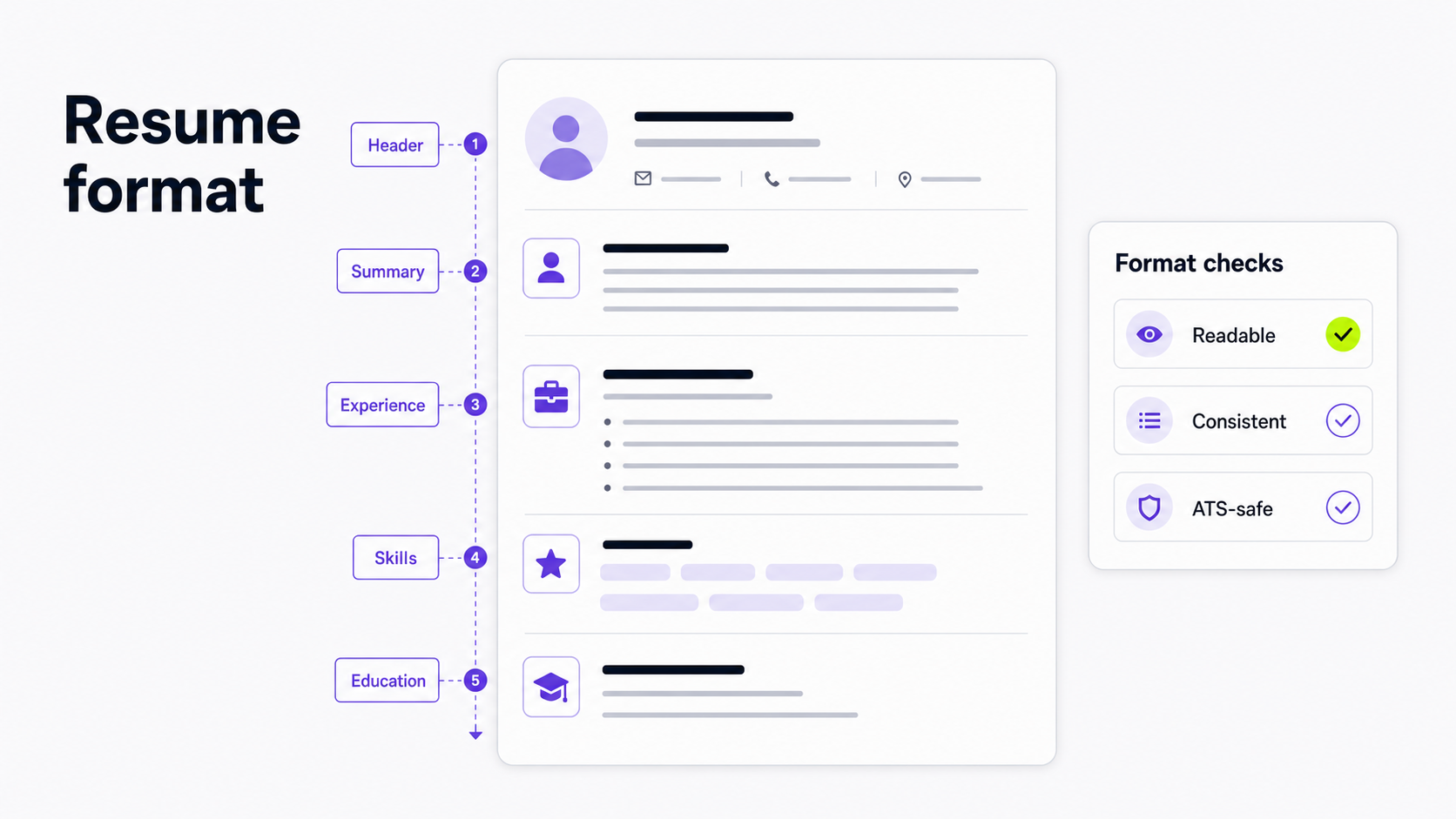
What does resume format mean?
"Resume format" can mean three different things:
- The resume type: reverse-chronological, functional, or combination.
- The page layout: section order, margins, spacing, headings, fonts, bullets, and dates.
- The delivery format: PDF, Word document, plain text, or an online profile.
Most resume advice mixes these together. That makes formatting feel more complicated than it is.
Start with the job your resume has to do:
- A recruiter should understand your fit in a quick scan.
- A hiring manager should see proof that you can do the work.
- An applicant tracking system should be able to read your name, contact details, job titles, dates, skills, and education.
If a formatting choice helps those three jobs, keep it. If it makes the resume prettier but harder to read, remove it.
The three main resume formats
Most resumes use one of three formats: reverse-chronological, functional, or combination.
Reverse-chronological resume format
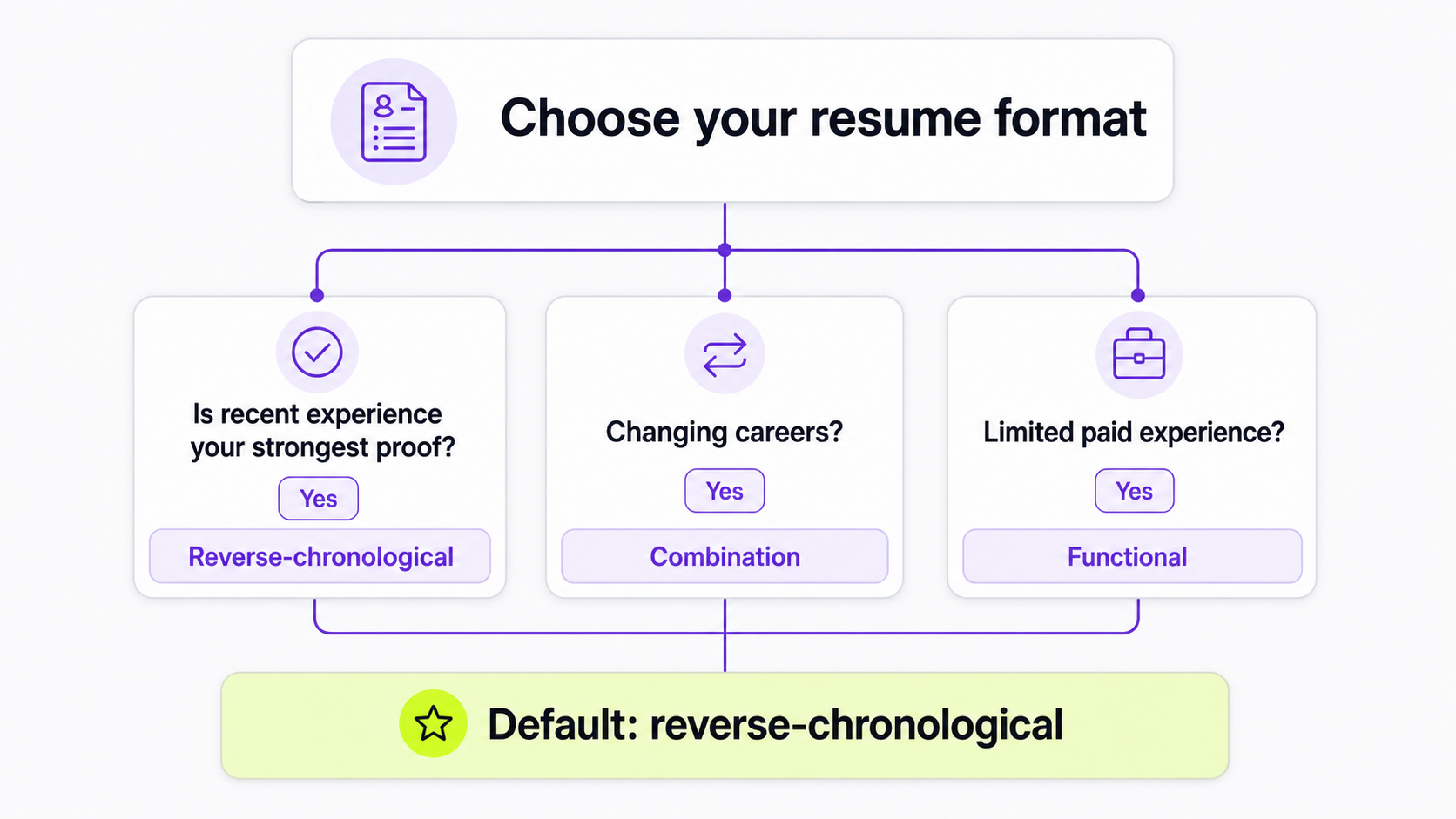
A reverse-chronological resume lists your work experience from most recent to oldest. This is the safest default for most job seekers.
Use it when:
- Your recent experience is relevant to the role.
- Your career path is fairly clear.
- You want recruiters to see your current or most recent responsibilities quickly.
- You are applying through online systems where simple parsing matters.
Typical section order:
- Contact information
- Resume summary
- Work experience
- Skills
- Education
- Optional sections
This format is strong because it matches how recruiters usually review resumes: role, company, dates, scope, and evidence.
Functional resume format
A functional resume puts skills and capability areas above work history. It reduces the emphasis on dates and job titles.
Use it carefully. A purely functional resume can make recruiters wonder what you did, where you did it, and when you did it. It can also be harder for parsing systems because experience is separated from employers and dates.
Functional resumes are most useful when:
- You have very limited paid experience.
- You have project, volunteer, freelance, or coursework proof that matters more than job titles.
- You are returning to work and need to show current skills.
Even then, do not hide your work history. Include a short employment section with titles, organizations, and dates.
Combination resume format
A combination resume, sometimes called a hybrid resume, blends a skills-led opening with reverse-chronological work history.
Use it when:
- You are changing careers.
- Your job titles do not clearly show your fit.
- You have strong transferable skills.
- You have technical skills that need to appear near the top.
- You want to show both skills and real work proof.
Typical section order:
- Contact information
- Resume summary or objective
- Key skills or selected achievements
- Work experience
- Education
- Optional sections
This is often better than a purely functional resume because it still gives recruiters the timeline they expect.
Which resume format should you choose?
Use this as a quick decision rule:
| Situation | Best format | Why |
|---|---|---|
| You have relevant recent experience | Reverse-chronological | Shows career progression and recent proof quickly. |
| You are entry-level | Reverse-chronological with education/projects moved up | Keeps structure familiar while highlighting available proof. |
| You are changing careers | Combination | Connects transferable skills to real experience. |
| You have employment gaps | Reverse-chronological or combination | Lets you explain gaps honestly without hiding the timeline. |
| You are applying for technical roles | Reverse-chronological or combination | Makes tools, skills, projects, and work history easy to scan. |
| You are applying for remote roles | Reverse-chronological | Lets you show remote achievements inside each role. |
| You have mostly freelance or project work | Combination | Highlights relevant projects while still giving dates and clients. |
When in doubt, choose reverse-chronological. It is the clearest default.
Standard resume section order
For most job seekers, use this order:
- Header
- Resume summary or objective
- Work experience
- Skills
- Education
- Certifications, projects, volunteer work, publications, awards, or languages
You can change the order when the job requires it.
Move education higher if you are a student, recent graduate, or applying for a role where your degree, coursework, or academic project is the strongest proof.
Move skills higher if you are applying for technical roles where tools, programming languages, certifications, or platforms are screening criteria.
Move projects higher if your projects are more relevant than your paid work.
Move certifications higher if they are required for the role.
How to format your resume header
Your header should be simple. Include:
- Name
- Email address
- Phone number
- City, state, or country if relevant
- LinkedIn URL
- Portfolio, GitHub, personal site, or relevant profile
Do not use a full street address unless the employer specifically needs it. Do not bury contact details in a graphic header or footer that might parse poorly.
Good header:
Maya Chen
Sydney, NSW | maya.chen@email.com | +61 400 000 000
linkedin.com/in/mayachen | mayachen.design
Keep links short and professional. If a portfolio is central to the job, include it in the header rather than in a footnote.
If you use a short role label under your name, keep it to one line and make it specific. Use these resume headline examples before deciding whether you need a headline, a summary, or both.
How to format a resume summary or objective
Use a summary when your experience already points toward the role. Use an objective when your direction needs context.
A summary should be 2-4 lines and cover:
- Target role or professional identity
- Years or scope of experience if useful
- Relevant skills
- One or two proof points
For examples, read Resume Summary Examples.
An objective should explain the role you are targeting and why your background fits, especially if you are entry-level, changing careers, returning to work, or relocating. For examples, read Resume Objective Examples.
Skip both if they are generic. A weak summary wastes the most valuable space on the page.
How to format work experience
For each role, use a consistent structure:
Job Title
Company Name | Location or Remote | Month Year - Month Year
- Achievement-focused bullet with action, scope, and result.
- Achievement-focused bullet with relevant tools, process, or collaboration.
- Achievement-focused bullet that matches the target job.
For current roles, use present tense for work you still do and past tense for completed achievements. For previous roles, use past tense.
Recent and relevant roles can usually have 3-5 bullets. Older or less relevant roles can have 1-3 bullets. If a role is not relevant, do not force a long description.
Weak bullet:
- Responsible for customer support.
Stronger bullet:
- Resolved 45+ customer support tickets per week across US and APAC time zones while documenting recurring product issues for the engineering team.
The stronger bullet gives scope, frequency, context, and collaboration.
For more detail, use the Himalayas guides on how to write resume bullet points and how to quantify resume achievements.
How to format skills
Your skills section should be easy to scan and relevant to the job.
Group skills when the list is long:
Skills
Analytics: SQL, Excel, Looker, cohort analysis
Project management: Jira, sprint planning, stakeholder updates
Customer research: interviews, survey analysis, usability testing
Avoid generic soft skills with no proof:
Hardworking, motivated, team player, detail-oriented
If a soft skill matters, prove it in a work-experience bullet. For example, "Created weekly launch updates for 5 cross-functional teams" proves written communication better than listing "communication."
Use Resume Skills to choose the right skills and How to Use Resume Keywords to match the language of the job description without keyword stuffing.
How to format education
For most candidates, education can be short:
Bachelor of Commerce, University of Melbourne
Add graduation year if it helps or if you are early career. If you have years of relevant experience, the year is usually optional.
Add coursework, honors, projects, or GPA only when they strengthen your case. Recent graduates can move education above work experience and include more detail.
How to format optional sections
Optional sections should earn their space.
Useful optional sections include:
- Projects
- Certifications
- Volunteer work
- Publications
- Awards
- Languages
- Speaking
- Open-source work
- Portfolio work
Do not add hobbies unless they are relevant to the role or help explain a meaningful part of your background.
For remote roles, optional sections can help show proof of async work, documentation, distributed collaboration, community building, or open-source contribution. For more detail, read How to Write Your Remote Job Resume.
Resume layout rules
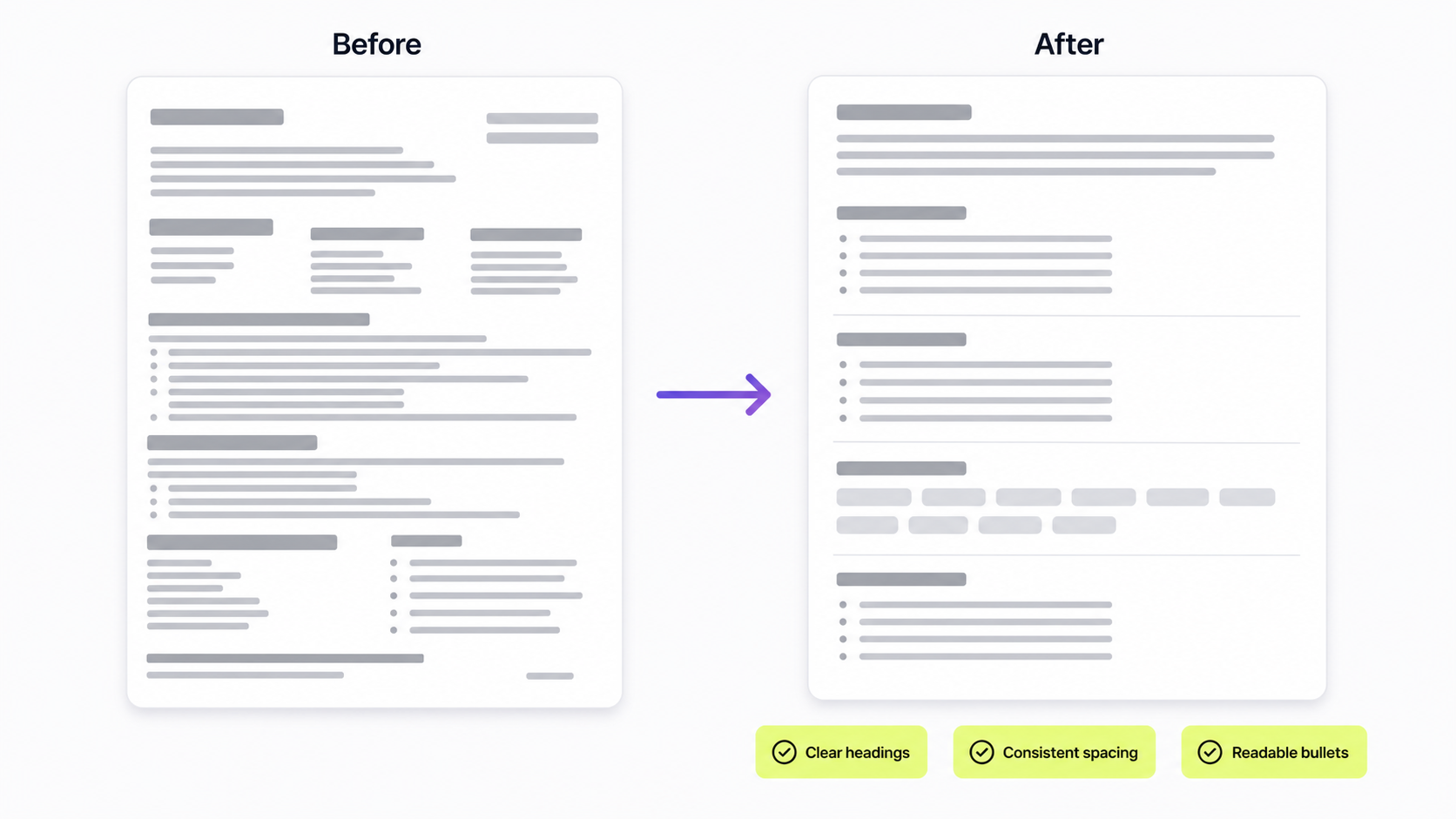
Good resume formatting is restrained. It creates hierarchy without making the page busy.
Length
Use one page if you are entry-level, early career, or can tell the story clearly in one page.
Use two pages if you are experienced and the second page adds relevant proof. Do not shrink the font, margins, or spacing just to force a crowded one-page resume.
Margins
Use margins around 0.5-1 inch. Very narrow margins make the resume feel cramped and can create printing or export problems.
Fonts
Use a readable font. Good choices include Arial, Calibri, Cambria, Garamond, Georgia, Helvetica, and Times New Roman.
Use 10-12 point body text. Use slightly larger headings. Avoid novelty fonts, condensed fonts, and decorative scripts.
For a deeper comparison, read Best Fonts for a Resume.
Spacing
Use enough white space that the reader can distinguish sections quickly. Keep spacing consistent between roles, bullets, and headings.
Do not make every line dense. A readable resume is better than a resume that technically fits more content.
Headings
Use standard headings:
- Summary
- Experience
- Skills
- Education
- Projects
- Certifications
Creative headings like "Where I have made an impact" or "Things I know" can confuse recruiters and parsing systems. Save personality for the content, not the section labels.
Bullets
Use bullet points for achievements under each role. Keep most bullets to 1-2 lines.
Start with a strong action verb, then add scope and outcome:
- Automated weekly reporting for 12 account managers, reducing manual spreadsheet work by 6 hours per week.
Dates
Use a consistent date format:
Jan 2023 - Present
January 2023 - Present
2021 - 2024
Any of these can work. Do not mix formats across the resume.
File format: PDF, Word, or plain text?
Use the file format requested in the job posting. If the employer asks for a Word document, send a Word document. If the application system requires PDF, upload PDF.
If there is no instruction, PDF is usually a good default because it preserves layout. Keep a Word or Google Docs version available so you can edit quickly and comply with employer requirements.
Do not submit a resume as a JPEG, PNG, screenshot, or image-only PDF. Those formats can make text hard or impossible to parse.
Name the file clearly:
Maya-Chen-Product-Manager-Resume.pdf
Avoid vague names:
resume-final-final-v7.pdf
ATS-safe resume formatting
An ATS-safe resume is not a keyword-stuffed resume. It is a readable resume with structure that software can parse and humans can scan.
Use these rules:
- Prefer a single-column layout for online applications.
- Use standard section headings.
- Keep contact details in the main body, not only in a header or footer.
- Avoid text boxes for essential information.
- Avoid tables for core resume content.
- Avoid images, icons, charts, skill bars, and decorative graphics for key information.
- Use real text, not flattened images.
- Match relevant job-description language honestly.
- Test the exported file before submitting.
For a full workflow, read How to Make an ATS-Friendly Resume.
Resume format examples by situation
Entry-level resume format
Use reverse-chronological structure, but move education, projects, internships, coursework, volunteer work, or certifications higher if they are your strongest proof.
Suggested order:
- Header
- Objective
- Education
- Projects or internships
- Skills
- Volunteer work or part-time work
Read How to Write a Resume With No Experience for examples.
Career-change resume format
Use a combination format. Put a short summary, target skills, and selected achievements near the top, then include work history.
Suggested order:
- Header
- Summary or objective
- Relevant skills
- Selected projects or achievements
- Work experience
- Education and certifications
Do not hide your previous experience. Reframe it around transferable skills and evidence.
Technical resume format
Use reverse-chronological or combination format. Put technical skills near the top if they are screening criteria.
Suggested order:
- Header
- Summary
- Technical skills
- Work experience
- Projects
- Education and certifications
Keep tools and technologies grouped. Show where you used them in experience bullets.
Remote job resume format
Use reverse-chronological format, then make remote-relevant proof visible inside your bullets.
Useful proof includes:
- Async documentation
- Time zone coverage
- Written handoffs
- Distributed project delivery
- Remote onboarding
- Customer support across regions
- Meeting reduction
- Cross-functional updates
Example:
- Created async launch updates for a 9-person remote team across 4 time zones, reducing recurring status meetings from 3 per week to 1.
Then use remote jobs on Himalayas to compare your resume against roles that match your target location, time zone, and skills.
Common resume formatting mistakes
Choosing design over readability
A resume is not a poster. If the design makes the reader work harder, simplify it.
Using two columns for important information
Two-column resumes can look polished, but they can create reading-order and parsing issues. Use one column for applications where ATS parsing matters.
Hiding dates
Trying to hide dates often creates more concern than it solves. Be clear and use the resume content, cover letter, or interview to explain context when needed.
Making every section the same weight
The most relevant information should be easiest to find. Do not give old jobs, unrelated education, and minor certifications the same space as your strongest proof.
Overloading the skills section
A long list of skills is not a substitute for proof. Choose skills that match the job and show them again in work bullets.
Using inconsistent formatting
Different date styles, heading sizes, bullet indentation, and spacing choices make the resume feel sloppy. Consistency signals care.
Forgetting to tailor the resume
Format gives the resume structure. Tailoring makes it relevant. After the structure is clear, use the Himalayas job description keyword finder and the guide to tailor your resume to a job description.
AI prompt to format your resume
Use this prompt when you already have resume content and want formatting help:
Review my resume for formatting, structure, and readability.
Rules:
- Do not invent experience, skills, dates, employers, metrics, or credentials.
- Recommend the best resume format: reverse-chronological, combination, or functional.
- Suggest section order based on the target job.
- Flag ATS parsing risks such as columns, tables, text boxes, icons, graphics, headers, footers, and unclear headings.
- Suggest where to shorten, move, or expand content.
- Keep recommendations practical and explain why each change helps.
Target job description:
[paste job description]
Resume content:
[paste resume]
The Himalayas AI resume builder can help you turn those formatting decisions into a cleaner resume, especially when you are tailoring the same experience to multiple roles.
Resume format checklist
Before applying, check:
- Did I choose reverse-chronological format unless I have a clear reason not to?
- Is my header simple and readable?
- Are my contact details easy to find?
- Does the top third of the resume show my target role and strongest proof?
- Are sections in the right order for my situation?
- Are headings standard and consistent?
- Are dates formatted consistently?
- Are bullets achievement-focused?
- Did I remove outdated or irrelevant details?
- Is the font readable at normal size?
- Are margins and spacing comfortable?
- Is the resume one page unless a second page adds relevant proof?
- Did I avoid essential information in tables, text boxes, images, icons, headers, or footers?
- Did I save the file in the format the employer requested?
- Did I tailor the resume to the job description?
- Did I track the tailored version in my job application tracker?
FAQ
What is the best resume format?
The best resume format for most job seekers is reverse-chronological. It lists your most recent experience first, shows career progression clearly, and is easy for recruiters and applicant tracking systems to scan.
What are the main resume formats?
The three main resume formats are reverse-chronological, functional, and combination. Reverse-chronological focuses on work history, functional focuses on skills, and combination blends skills with work history.
Is a functional resume a good idea?
A purely functional resume is usually not the best default because it can make your timeline unclear. If you need to highlight transferable skills, a combination resume is often safer because it still includes clear work history.
Should my resume be one page?
Use one page if you can show your relevant proof clearly. Use two pages if you have enough relevant experience to justify the space. Do not make the resume unreadable just to force one page.
Should I submit my resume as a PDF or Word document?
Follow the job posting. If there is no instruction, PDF is usually a good default because it preserves layout. Keep a Word or Google Docs version ready in case the employer requests it.
Is a two-column resume ATS-friendly?
Sometimes, but it is riskier than a single-column resume. For online applications, a single-column layout with standard headings is the safest choice.
What should I put first on a resume?
Put your header first. After that, use the section that best proves your fit. For most job seekers, that is a summary and work experience. For students or recent graduates, education or projects may come before work experience.
How do I format a resume with no experience?
Use a familiar structure but move education, projects, coursework, volunteer work, internships, certifications, and relevant skills higher. The goal is to show proof, even if that proof did not come from full-time paid work.
Final recommendation
Choose the simplest resume format that makes your strongest proof easy to find. For most people, that means a reverse-chronological, single-column resume with clear headings, consistent dates, readable spacing, and achievement-focused bullets.
Once the format is clear, tailor the content to the role. Use the Himalayas AI resume builder to build a clean version, check the job description with the keyword finder, and save each tailored version in your job application tracker before applying.



