

A remote job is probably a scam if the recruiter contacts you unexpectedly by text or messaging app, avoids a real interview, offers unusually high pay for easy work, asks you to pay money, sends a check for equipment, requests sensitive information before a verified offer, or uses an email address or domain that does not match the real company.
Before you reply, pause and verify the job through official company channels. Go directly to the company's website, check whether the role appears on its careers page, confirm the recruiter's identity, and never send money to an employer. Legitimate employers do not need you to buy your own job, unlock tasks with crypto, deposit a check and send money back, or share bank details before a real hiring process.
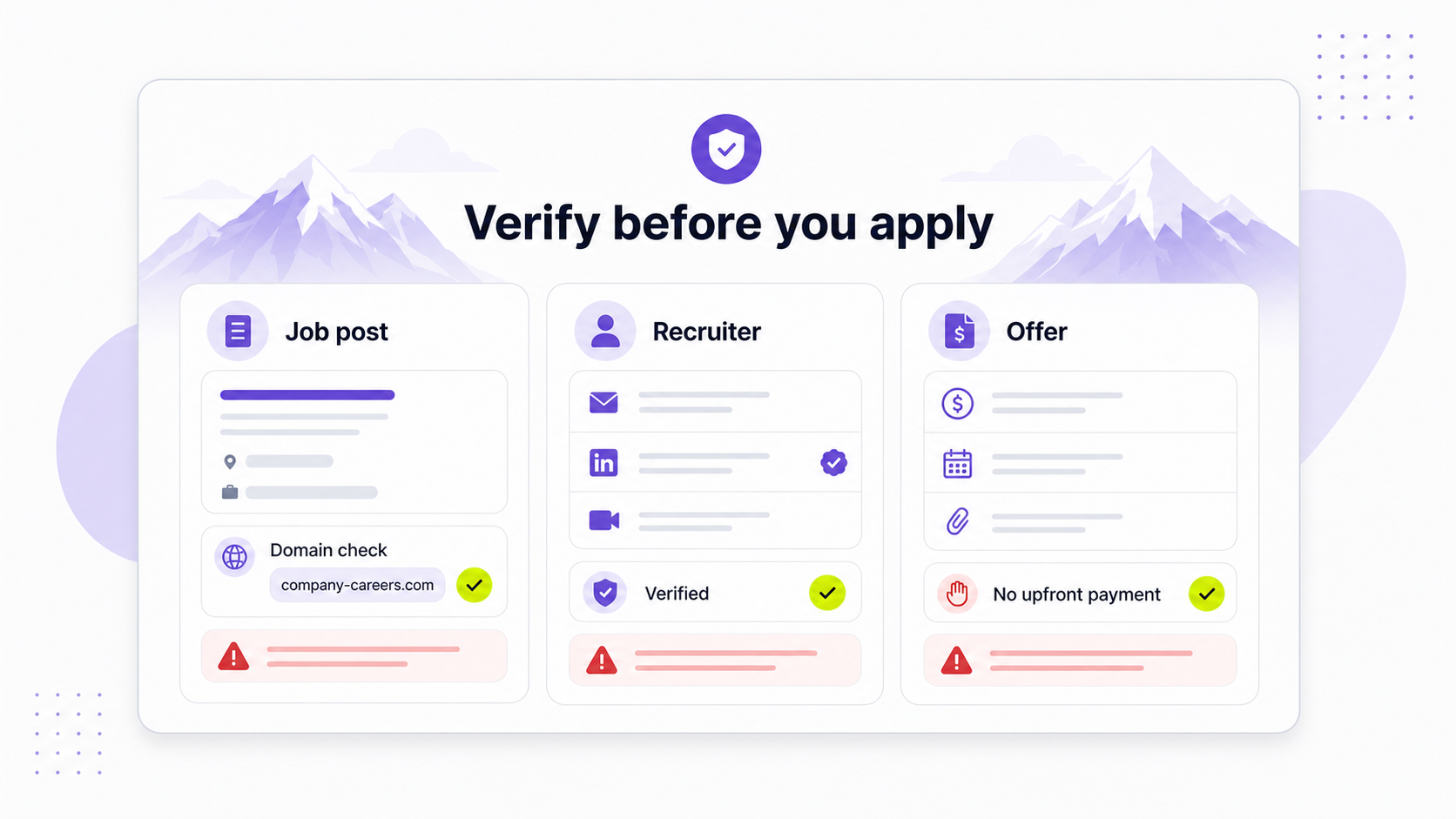
Why remote job scams are common
Remote hiring is legitimate. The problem is that it gives scammers useful cover.
A remote candidate may never visit an office, meet a recruiter in person, or see company equipment before onboarding. That makes it easier for someone to impersonate a recruiter, copy a real company's name, create a similar-looking domain, and rush a job seeker through a fake process.
Scammers also know that job seekers often feel pressure to move quickly. A message that says "remote role," "flexible hours," and "great pay" can feel like an opportunity worth grabbing, especially if you have been searching for a while.
The safest response is not paranoia. It is a repeatable verification process.
Remote job scam red flags
One red flag does not always prove a scam, but several together should make you stop. Treat these as warning signs that need verification before you continue.
| Red flag | Why it is risky | What to do instead |
|---|---|---|
| The recruiter contacts you unexpectedly by SMS, WhatsApp, Telegram, or social DM | Fake recruiters often start outside normal hiring channels | Do not click links. Verify the role and recruiter through the company website |
| The job description is vague | Scams often sell "remote work" without real responsibilities | Ask for the official job posting, team, manager, and responsibilities |
| Pay is unusually high for simple work | Scammers use high pay to override skepticism | Compare the salary with similar roles and check whether the duties justify it |
| There is no real interview | Legitimate remote employers still evaluate skills and fit | Expect video, phone, or structured interviews with role-specific questions |
| The recruiter uses a personal email address | Real recruiters usually use a company domain or verified recruiting platform | Compare the email domain with the company's real domain |
| The role is missing from the company's careers page | Scammers often impersonate real companies | Search the company's official careers page or ATS directly |
| You are asked to pay for training, software, background checks, or equipment | Paying to get hired is a classic scam signal | Do not pay. Legitimate employers handle these costs through normal processes |
| You are sent a check and told to buy equipment or send money back | Fake check scams can leave you responsible when the check bounces | Call your bank and do not spend or transfer the money |
| You are asked for SSN, passport, driver's license, or bank details before a verified offer | Scammers use fake onboarding to steal identity data | Share sensitive information only after a verified offer through official systems |
| Payment involves crypto, gift cards, wire transfers, or payment apps | These payments are hard to reverse | Never send money to an employer or recruiter |
| The process is urgent | Pressure keeps you from checking details | Slow down and verify independently |
The FTC warns job seekers that fake recruiters may impersonate well-known employers, move quickly, and ask for personal or financial information before a real interview. The FTC also warns about fake job texts that mention remote positions and ask people to reply before pushing them toward fake checks or task scams.
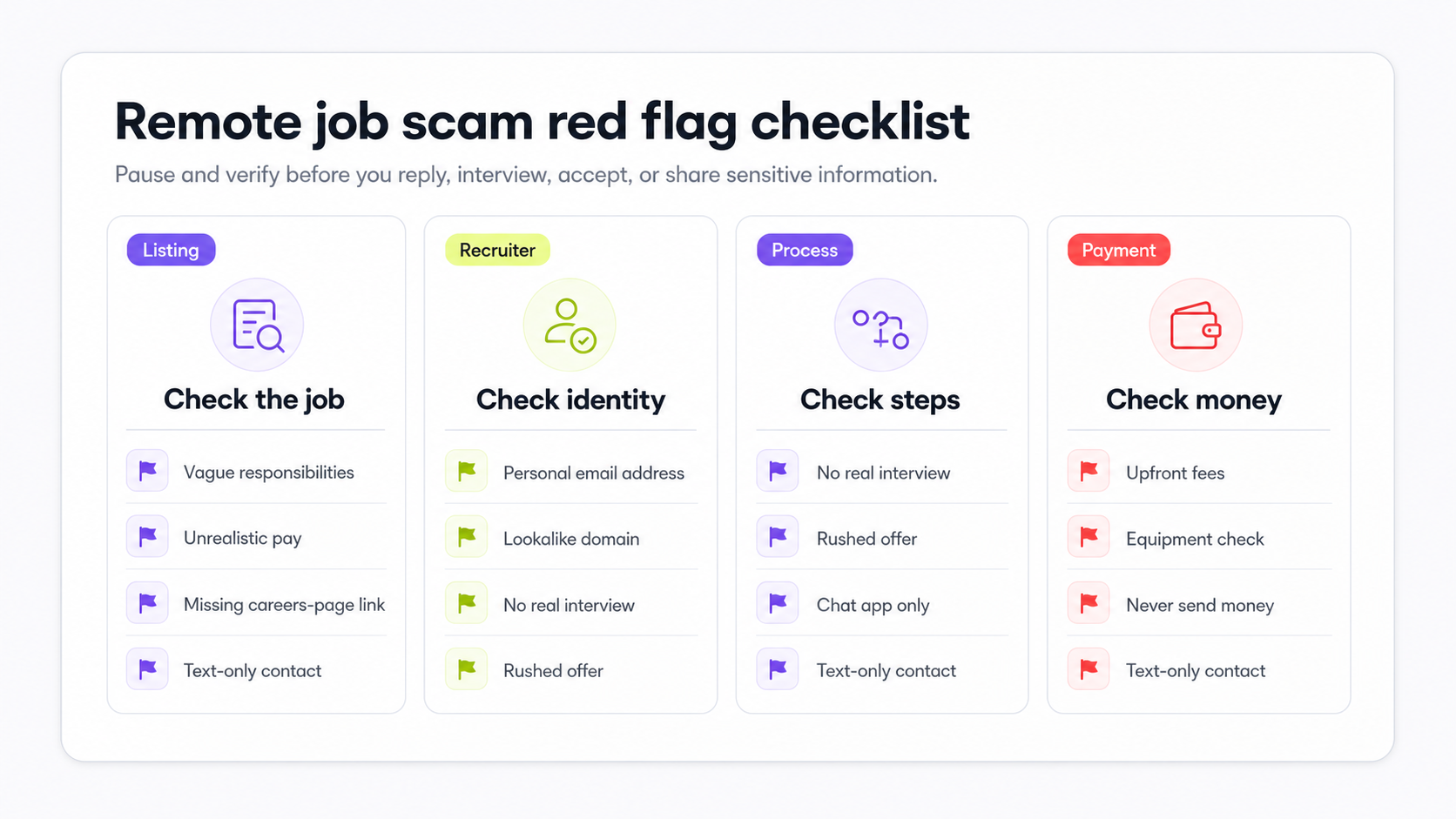
Common remote job scams
Remote job scams usually follow a small number of patterns. Knowing the pattern helps you catch the scam before the story changes.
Fake recruiter impersonation
A scammer pretends to recruit for a real company. They may use the company's logo, copy its job descriptions, create a fake email signature, or send official-looking documents.
Watch for:
- Email domains that almost match the real company but are not exact.
- Recruiters who cannot be found on the company website or LinkedIn.
- Interviews that happen only by chat.
- Requests for personal information before the employer has verified your identity through a normal process.
If a recruiter claims to work for a company, contact the company through its official careers page or website. Do not use the phone number, email, or link the recruiter gave you until you have verified it independently.
Fake job listings
Scammers can post fake jobs on fake job boards, social media, community groups, and sometimes even large platforms. A listing may use a real company name or invent a company that sounds plausible.
Watch for:
- Generic descriptions that could apply to any role.
- No clear team, manager, skills, tools, or responsibilities.
- Salary that is far above the work described.
- Poorly matched company details.
- Application forms that ask for more personal data than a normal first application needs.
Real job posts are not always perfect, but they usually tell you what you will do, who you will work with, what qualifications matter, and how the hiring process works.
Fake check and equipment scams
In this scam, the "employer" sends a check and tells you to buy a laptop, software, or home-office equipment from a required vendor. The vendor is fake or controlled by the scammer. The check may appear to clear at first, but later bounces. By then, you may have already sent real money.
No legitimate remote employer needs you to deposit a check, buy equipment from a required vendor before you start, and send money back.
If a remote employer provides equipment, they usually ship it directly, reimburse approved expenses through payroll or expense systems, or provide a stipend after you are actually hired.
Task scams and "optimization" jobs
Task scams often claim you can earn money by rating products, optimizing apps, clicking buttons, reviewing restaurants, or completing simple online tasks. The fake dashboard may show earnings, but eventually you are asked to deposit your own money to unlock tasks, complete a level, or withdraw your balance.
The FBI IC3 has warned about work-from-home scams involving simple tasks, "optimization" language, and cryptocurrency payments to unlock earnings.
If a job requires you to pay money to earn money, stop.
Reshipping and package-forwarding schemes
Some scams offer a remote logistics, shipping, inspection, or package forwarding role. You receive packages, relabel them, and send them somewhere else. The goods may be purchased with stolen payment information, and you may become part of a fraud chain.
The U.S. Postal Inspection Service warns about work-from-home scams and reshipping schemes. Be especially cautious of jobs that ask you to receive packages at home, inspect merchandise, or forward items for a company you cannot verify.
Identity theft and resume harvesting
Some fake jobs exist mainly to collect personal information. Your resume already includes your name, work history, phone number, email, and sometimes location. Fake onboarding forms may ask for Social Security numbers, passport scans, driver's licenses, bank details, tax forms, or direct deposit details before there is a real job.
Share the minimum required information during the application stage. Save sensitive information for verified employers, official systems, and the correct point in onboarding.
Fake onboarding portals and malware
A scammer may send you an "assessment," "employee portal," "background check," or "onboarding document" that asks you to create an account, enter credentials, upload ID, or download a file.
Do not download attachments from unverified recruiters. Do not reuse passwords. Do not enter login details into a portal unless you have verified the company, domain, and hiring process.
Pay-to-start remote business pitches
Some offers are framed as remote jobs but are really pay-to-start schemes. They may ask you to buy training, inventory, software, certification, lead lists, or a starter kit before you can earn.
If the opportunity requires upfront payment and focuses more on recruiting, fees, or vague earning potential than real work for real customers, treat it as suspicious.
What legitimate remote hiring usually looks like
Legitimate remote hiring can be fast, but it still has structure. You should be able to understand the role, verify the employer, meet real people, and receive clear next steps.
| Normal remote hiring | Suspicious scam pattern |
|---|---|
| The job appears on the company's careers page or ATS | The role exists only in a message, PDF, or unknown form |
| The recruiter uses a company email or verified professional channel | The recruiter uses Gmail, WhatsApp, Telegram, SMS, or a lookalike domain |
| The job description names responsibilities, requirements, team, and employment type | The description is mostly "remote," "flexible," "easy," and "high pay" |
| Interviews include real people and role-specific questions | The interview is text-only, scripted, or barely evaluates your skills |
| Compensation, location eligibility, timezone expectations, and start date are discussed clearly | Pay is high but details are vague or inconsistent |
| Equipment is shipped, expensed, or reimbursed through standard systems after hiring | You are sent a check or told to buy from a required vendor before starting |
| Sensitive information is collected through secure official systems after a verified offer | You are asked for bank details, ID, or tax information before real interviews |
For remote roles, also check location rules. A legitimate job may be remote but still require you to live in a certain country, state, province, or timezone. Scam listings often ignore these details because they are trying to attract as many people as possible.
How to verify a remote job before replying
Use this process before you click links, share documents, or continue a conversation that feels unusual.
1. Search for the company independently
Open a browser and search for the company name yourself. Do not use links from the message yet.
Look for:
- Official website.
- Careers page.
- LinkedIn company page.
- Real employees.
- Product, customers, press, funding, or business registry records.
- Reviews or public discussion that match the company's size and age.
Small companies may have less public information, but there should still be enough to confirm that the business exists and the contact route is real.
2. Check the official careers page
Go directly to the company's website and look for its careers page. If the job is real, it may appear there or in an official applicant tracking system such as Greenhouse, Lever, Ashby, Workable, or another ATS.
If the job does not appear, that does not automatically prove fraud. Some roles are sourced privately. But it does mean you should verify the recruiter through an official company contact before continuing.
3. Compare the email domain
Look carefully at the sender's email address.
If the real company uses:
company.com
be suspicious of:
company-careers.com
companyjobs.net
company-hr.org
company.recruiting@gmail.com
Scammers often use lookalike domains that feel plausible at a glance. Check every letter. Search the domain separately. If the company website lists a recruiting contact, compare it.
4. Verify the recruiter
Search the recruiter's name with the company name. Check whether they appear on LinkedIn, the company website, or other credible professional pages.
Be cautious if:
- The profile was created recently.
- The person has very few connections.
- Their work history does not match the company.
- They refuse to email from a company domain.
- They cannot explain the role, team, or hiring process.
You can also contact the company through an official address and ask whether the recruiter and role are real.
5. Search the job title and message text
Copy a distinctive sentence from the job post or recruiter message and search it in quotes. Scammers often reuse the same wording across fake listings.
Also search:
[company name] scam
[company name] fake recruiter
[job title] scam
[email domain] scam
Do not rely on one result. Look for patterns.
6. Ask normal hiring-process questions
A real recruiter should be able to answer basic questions:
- Who is the hiring manager?
- What team is this role on?
- What are the main responsibilities?
- What tools does the team use?
- What is the interview process?
- Is the role employee, contractor, full-time, part-time, or temporary?
- What countries, states, or timezones are eligible?
- How is equipment handled?
Scammers often dodge specifics because there is no real team or role.
How to verify a remote job offer before accepting
An offer can look official and still be fake. Before accepting, check the offer against the process that came before it.
Ask yourself:
- Did I have real interviews with real people?
- Did the questions evaluate my skills and experience?
- Does the offer match the role I applied for?
- Does the compensation make sense for the role, level, and location?
- Did the offer arrive from an official company email or system?
- Can I verify the manager, recruiter, and company domain?
- Is onboarding handled through official company systems?
- Am I being asked to pay, deposit a check, buy equipment, or send money?
- Am I being rushed to provide bank details, ID, or tax information before verification?
If anything feels off, slow the process down. A real employer can wait while you verify. A scammer needs you to move before you think.
What to do if you suspect a scam
If you think a remote job may be fake, stop the conversation and preserve evidence.
Do this:
- Stop replying.
- Do not click more links or download attachments.
- Save screenshots of messages, emails, job posts, phone numbers, usernames, domains, documents, and payment requests.
- Report the listing to the job board, social platform, or messaging platform.
- Contact the real company through official channels if someone is impersonating it.
- Report fraud to the right authority.
In the U.S., you can report scams to the FTC at ReportFraud.ftc.gov. If the scam involved internet crime, cryptocurrency, fake work-from-home tasks, or online payments, you can also report it to the FBI Internet Crime Complaint Center. If it involved mail, packages, or reshipping, review guidance from the U.S. Postal Inspection Service.
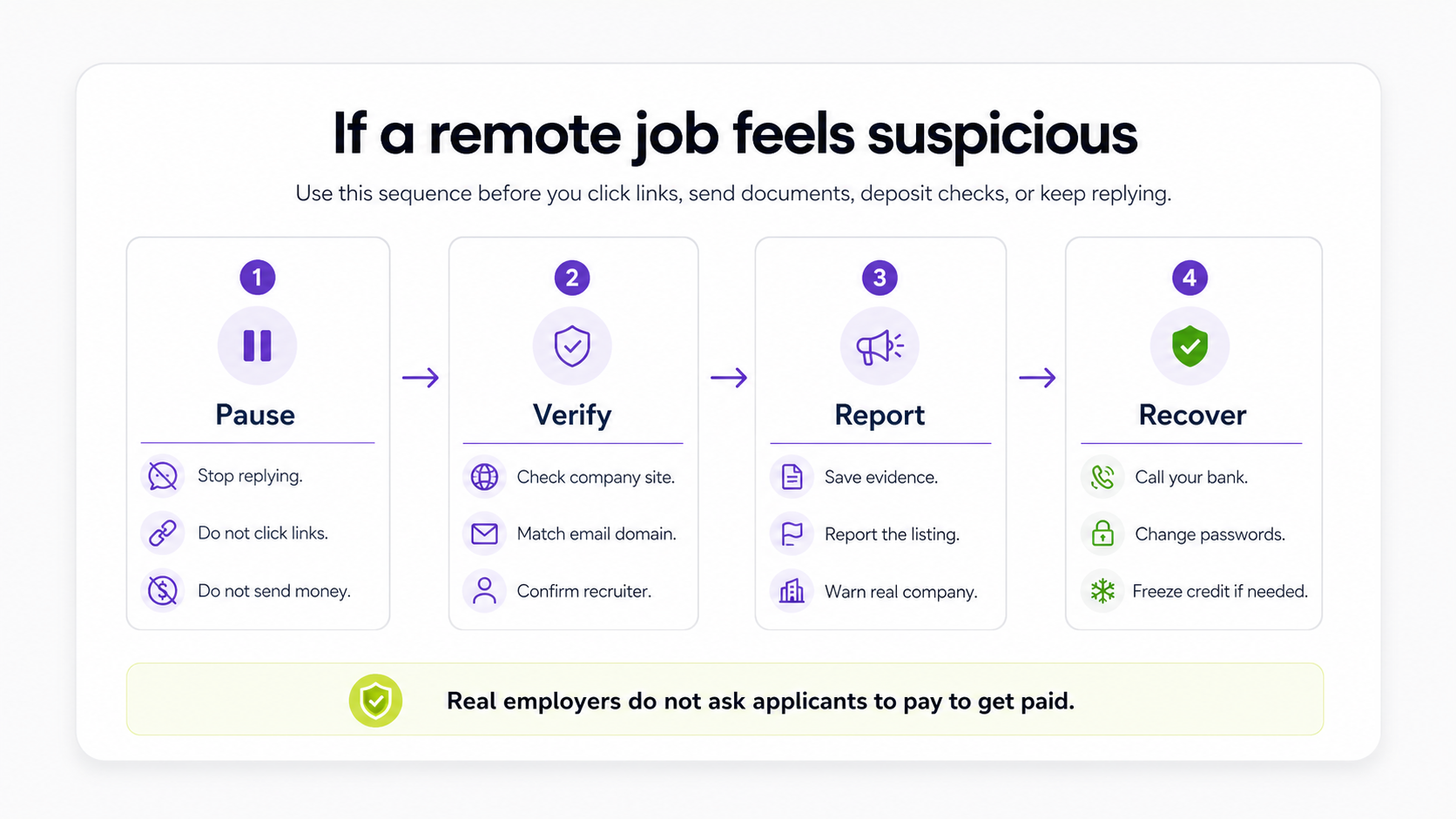
What to do if you already shared information or money
Act quickly. What you should do depends on what you shared.
| What happened | What to do |
|---|---|
| You sent money by bank transfer, card, payment app, wire, or crypto | Contact your bank, card issuer, payment app, or crypto platform immediately. Ask whether the transaction can be stopped, reversed, disputed, or documented |
| You deposited a check | Call your bank before spending, withdrawing, or sending any funds. Explain that it may be connected to a job scam |
| You shared bank details | Contact your bank, monitor transactions, change online banking passwords, and ask whether account protections or new account numbers are needed |
| You shared SSN, passport, driver's license, or other identity documents | Place fraud alerts, consider freezing your credit, monitor accounts, and use official identity-theft recovery guidance |
| You shared passwords or clicked suspicious links | Change passwords from a clean device, enable multi-factor authentication, sign out of active sessions, and scan your device |
| You shipped packages or received goods | Stop forwarding items, keep records, and contact postal inspection or law-enforcement guidance |
| You shared only a resume | Watch for phishing, protect your email, and be cautious of future messages that reference your work history |
Do not pay anyone who claims they can recover lost cryptocurrency or guaranteed scam losses for an upfront fee. Recovery scams often target people who have already been defrauded.
Safer remote job search habits
You cannot remove every risk from a job search, but you can reduce exposure.
Use these habits:
- Start from reputable job boards and official company career pages.
- Prefer links that go directly to a company's ATS or careers page.
- Use a dedicated email address for job applications.
- Save job descriptions before applying.
- Track the source, recruiter, company domain, application URL, verification status, and next action for every role.
- Avoid rushed replies to unsolicited messages.
- Verify any role before sending identity documents, bank details, or money.
- Keep screenshots and notes for suspicious interactions.
If you are building a broader search workflow, start with how to find a remote job and compare sources with the best remote job boards. The safest pattern is to find roles through reputable sources, verify the role on the employer's official site, and keep your own record of where each application came from.
You can browse remote jobs on Himalayas and verify each role before applying. If you are applying to multiple roles, use a job application tracker to record where each job came from, which recruiter contacted you, whether the company domain matched, and what your next action is.
Tracking does not only keep you organized. It also gives you a record if something feels wrong later.
Remote job scam verification checklist
Before you continue with a remote job opportunity, ask:
- Is the company real?
- Is the role listed on the official careers page or a trusted ATS?
- Does the recruiter email match the company's real domain?
- Can I verify the recruiter through LinkedIn or official company contact?
- Did the process include a real interview?
- Are the responsibilities, pay, location eligibility, and employment type clear?
- Am I being asked to pay for anything?
- Am I being asked to deposit a check or send money?
- Am I being asked for sensitive information too early?
- Is the process happening only through text, WhatsApp, Telegram, or social DMs?
- Is anyone pressuring me to act immediately?
If you cannot answer these confidently, pause and verify before moving forward.
FAQ
Are remote jobs scams?
No. Remote jobs are real, and many legitimate companies hire remotely. The risk is that scammers use remote work as bait because it is popular, flexible, and easier to fake from a distance. Treat remote roles like any other job: verify the company, recruiter, posting, interview process, and offer before sharing sensitive information.
How do I know if a remote job offer is real?
A real remote job offer should come after a normal hiring process with verified people, role-specific interviews, clear compensation, clear employment terms, and official company systems. Check that the role, recruiter, email domain, and offer details match the real company. If the offer arrived without a real interview or asks you to pay money, deposit a check, or share sensitive information early, treat it as suspicious.
Is a job offer over text a scam?
An unexpected text about a remote job is a major red flag, especially if it asks you to reply "YES," move to WhatsApp or Telegram, or click a link. Some recruiters may text after you have already applied and agreed to that contact method, but a cold text offering remote work should be verified before you engage.
Is a remote job equipment check a scam?
It is suspicious if an employer sends you a check and tells you to buy equipment, especially from a required vendor. Fake checks can appear to clear before they bounce, leaving you responsible for money you spent or sent. Legitimate employers usually ship equipment, reimburse approved expenses after hiring, or provide stipends through official systems.
Do legitimate remote jobs ask for Social Security numbers or bank details?
Legitimate employers may need tax, identity, and direct deposit information after you have accepted a verified offer. They should not need your Social Security number, passport, driver's license, bank account, or direct deposit details before a real interview or before the employer has been verified.
Can scammers post fake jobs on real job boards?
Yes. Reputable job boards reduce risk, but no platform can make every listing risk-free. Always verify the company, role, recruiter, and application process before sharing sensitive information or money.
What should I do if I gave my information to a fake recruiter?
Stop communicating, save evidence, report the scam, and respond based on what you shared. Contact your bank if you shared financial details or sent money. Change passwords if you shared credentials or clicked suspicious links. If you shared identity documents or a Social Security number, consider fraud alerts, credit freezes, account monitoring, and official identity-theft recovery guidance.
Where can I find legitimate remote jobs?
Start with reputable remote job boards and official company careers pages. You can search Himalayas remote jobs, then verify each role through the company's website or ATS before applying. Keep your applications organized so you know where each role came from and whether you have verified it.



