Current as of Nov 23, 2026
Himalayas Remote Jobs WordPress Plugin
The Himalayas Remote Jobs WordPress plugin is our free, official plugin for showing live jobs from Himalayas, the remote jobs marketplace, on your WordPress site. Lists need no account, and you don’t need jobs of your own: listings come from Himalayas, where people read the full description and find how to apply. Use it to share relevant jobs with your readers or show your company’s open roles on a careers page.
What you can add
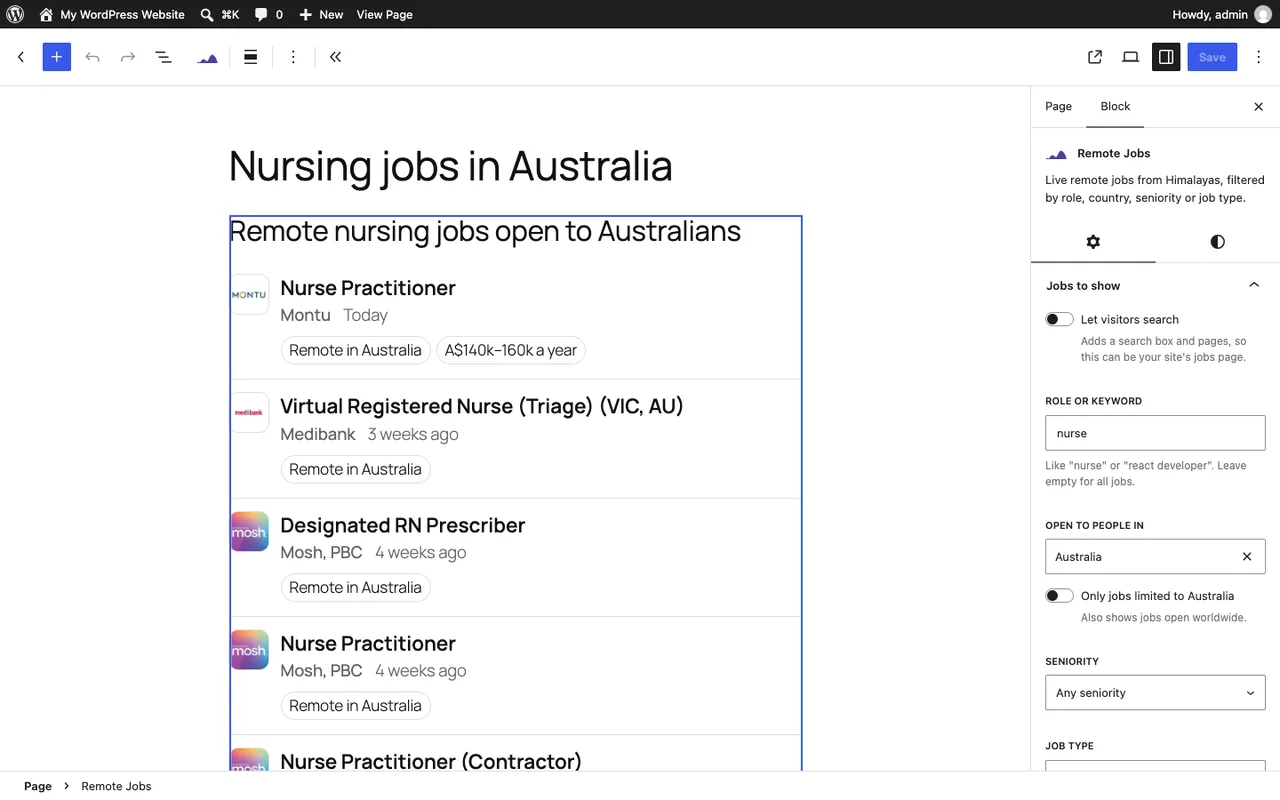
- Remote Jobs block: Show jobs for a role, skill or country, with filters you choose in the block sidebar.
- Company Careers block: Show one company’s open roles from its Himalayas profile.
- A searchable jobs page: Let visitors search by keyword and country.
- A shortcode: Add
[himalayas_jobs], a short instruction that displays jobs anywhere WordPress supports shortcodes.
Jobs for your readers’ role and country
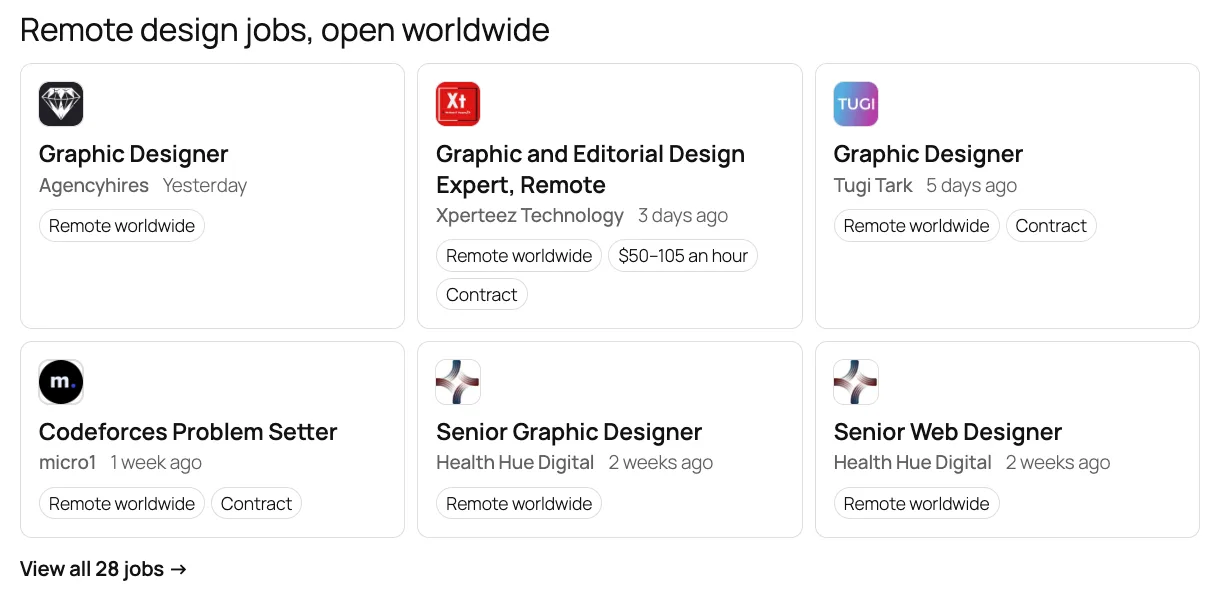
Choose jobs by keyword, country, seniority and job type so the list fits your audience. A bootcamp could show entry-level React jobs; a community could show roles open to people in Brazil.
We recommend setting a country when your readers live in one place, because a remote job isn’t necessarily open everywhere. “Remote in Brazil” tells readers where they can work from; “remote worldwide” means the role isn’t limited to particular countries.
| Setting | Jobs shown |
|---|---|
country="BR" | Jobs open to people in Brazil, including worldwide roles |
country="BR" country_only="true" | Jobs open to people in Brazil, excluding worldwide roles |
worldwide="true" | Only jobs open worldwide |
For React jobs open to readers in Brazil, use [himalayas_jobs country="BR" search="React"].
Choose a list or cards and display 1 to 20 jobs. Logos, salary when provided, short descriptions and dates are optional, so you can decide how much detail belongs on the page.
A jobs page visitors can search
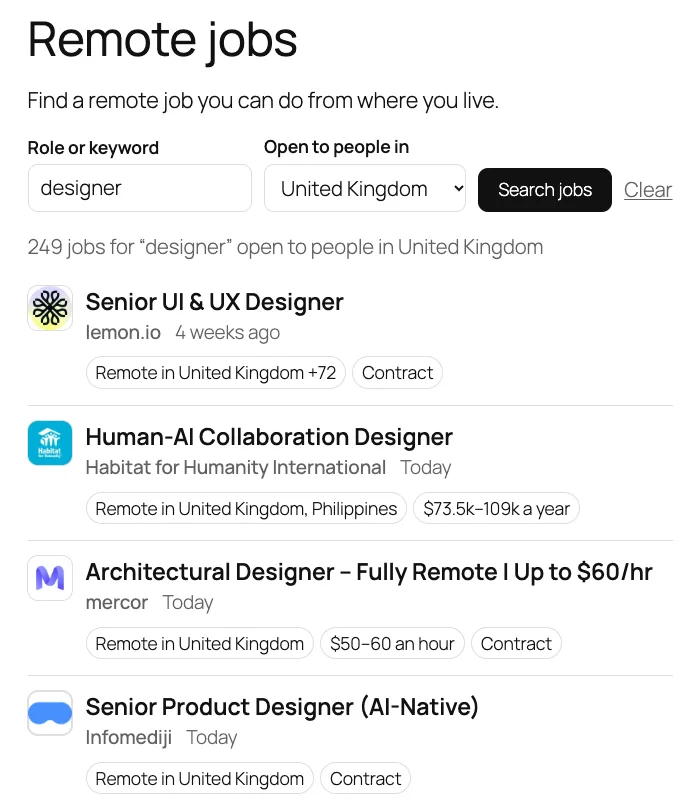
Turn on “Let visitors search” to give readers a keyword box, a country picker and pages of 20 jobs. This is the option we’d recommend when readers need to explore beyond the filters you’ve chosen.
Visitor search needs your site’s free API key, which gives your site its own, higher rate limit. Searches can be bookmarked and shared, and result pages are marked noindex, which tells search engines not to index each visitor’s search. Your main jobs page can still be indexed.
Your careers page, kept up to date
The Company Careers block keeps your careers page in sync with your company’s jobs on Himalayas. Post your jobs on Himalayas, then paste your company profile link into the block once.
New roles appear as the list refreshes, and closed roles drop out at the next successful refresh. You don’t need to copy listings across or maintain a second set of descriptions.

Set up in three steps
Install the plugin, add a jobs block, then enable search if your readers need it.
- Install and activate the Himalayas Remote Jobs WordPress plugin.
- Add the Remote Jobs block or Company Careers block in the block editor, or use the
[himalayas_jobs]shortcode. Choose your filters or paste your company link. - Add a free API key only for visitor search. Get a key, save it under Settings → Himalayas Jobs, then turn on “Let visitors search” or add
searchable="true"to your shortcode.
Lists and careers pages work without a key. If you’re on a free WordPress.com site, you’ll need to upgrade your plan to install plugins. Every shortcode option and setting is in the WordPress plugin docs.
How it fits your site
Jobs use your theme’s fonts and colours, with support for light and dark themes. WordPress block controls let you adjust colour, spacing and font size.
The plugin renders jobs on your server as plain HTML, so they show without JavaScript and search engines can read them. The lists you set up are saved on your server and refreshed in the background, hourly by default; you can change this in Settings → Himalayas Jobs. Most page views don’t wait on Himalayas.
If Himalayas can’t be reached, the last saved jobs in your lists keep showing, with that copy kept for up to a week. The plugin’s interface is translated into Spanish and Brazilian Portuguese and supports right-to-left layouts.
Plugin, widget or API
We recommend the plugin for WordPress because you can choose filters and display settings inside the block editor.
| Option | When to choose it |
|---|---|
| WordPress plugin | You want jobs or a careers page on WordPress, with country filtering. |
| JavaScript widget | You want to embed a keyword job search on any site where you can paste a line of code; the widget has no country filter. |
| Remote Jobs API | You’re building your own integration and need job data to work with directly. |
When to use a job board plugin instead
Choose a self-hosted job board plugin such as WP Job Manager if you want employers to post and pay on your site, or you want to host applications yourself.
The Himalayas Remote Jobs WordPress plugin only displays Himalayas jobs. It’s for adding relevant listings to your site or showing your company’s roles, with people reading the full description on Himalayas and finding how to apply there.
FAQ
Does it cost anything?
No. The plugin, Himalayas jobs API and API key are free.
Do I need an API key?
Only for visitor search. Lists and company careers pages work without an account or key.
Where do people apply?
Each listing links to its page on Himalayas, where people read the full description and find how to apply.
Do closed jobs disappear?
Yes, at the next successful refresh after a job closes on Himalayas. If Himalayas can’t be reached, the last saved copy may still show closed roles until refreshing resumes.
Does it add JobPosting structured data?
No. Google only allows JobPosting structured data on the page of a single job, so lists should not carry it. Each job’s own page on Himalayas has it.
What does it send to Himalayas?
Your server sends the job filters, your site’s address and your API key if you’ve added one. Visitor searches send the keyword and country, without the visitor’s IP address, cookies or account details. Visitors’ browsers load company logos from cdn-images.himalayas.app; job links include utm_ parameters naming your site so Himalayas can tell visits from this plugin apart from other traffic.
Can I style it?
Yes. Use block controls or override the himalayas-jobs CSS classes and custom properties in your theme.
Can I show a credit link?
Yes. Turn on “Jobs from Himalayas” in settings; it’s off by default. You can also hide the “View all jobs” link per list; if you do, turn the credit on.
Get matched with your dream remote job
Sign up now and join over 1,000,000+ remote workers who receive personalized job alerts, curated job matches, and more for free!